

Managing deliveries sounds simple — until orders start piling up.
Many delivery companies struggle with the same challenge: too many jobs on certain days, underutilized routes on others, and customers requesting delivery dates that simply aren’t possible. This often leads to overloaded drivers, delayed deliveries, and frustrated customers.
This is exactly where Route Capacity Planner in InstaDispatch becomes a game changer as part of a complete delivery management software solution.
The Route Capacity Planner feature helps delivery companies plan their routes, control daily job limits, and allow customers to schedule deliveries based on real operational capacity. Instead of reacting to delivery chaos, businesses can proactively manage their workloads.
Let’s take a closer look at how it works and why it’s valuable across multiple industries.
What is a Route Capacity Planner?
Capacity Planner is a feature in InstaDispatch that allows delivery companies to control how many jobs can be scheduled for each route and on which days deliveries are allowed.
Using this feature, dispatchers can:
- Create delivery routes based on postcodes or service zones
- Define which days deliveries are allowed for each route
- Set maximum jobs per day
- Define scheduling cutoffs
- Allow customers to select delivery dates based on availability
- Monitor vehicle volume capacity
- Receive warnings if a route exceeds the vehicle’s cubic meter capacity
- Prevent overbooking automatically
This ensures that deliveries are scheduled based on real operational capacity rather than guesswork.
How Capacity Planner Works
1. Create Delivery Routes Based on Zones
Dispatchers can create routes in the system by defining service zones using postcodes.
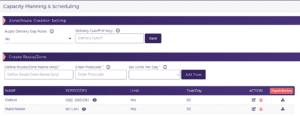
For example:
- Oxford Route → OX1, OX2, OX3
- Manchester Route → M1, M11
This allows businesses to group deliveries geographically, making route planning much more efficient. This works seamlessly with InstaDispatch’s route optimisation software to improve delivery efficiency.
2. Configure Delivery Days per Route
Some companies prefer delivering to certain regions only on specific days. With Capacity Planner, dispatchers can configure delivery days per route.
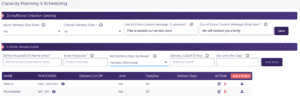
For example:
| Route | Delivery Days |
| Oxford | Monday, Wednesday, Friday |
| Manchester | Tuesday, Thursday |
This ensures deliveries are planned based on regional schedules, improving route optimization and driver efficiency.
If this option is disabled, the system can automatically assign delivery dates based on SLA rules.
3. Set Scheduling Cutoff Period
Businesses can also define a scheduling cutoff period.
This setting ensures that deliveries cannot be scheduled too soon after an order is placed.
Example:
- Cutoff = 2 days
- Order booked on Monday
- Earliest delivery option shown to customer = Thursday
This gives the operations team enough time to prepare shipments and plan routes properly.
4. Set Daily Job Limits per Route
One of the most powerful parts of Capacity Planner is the Daily Job Limit per Route. Dispatchers can define the maximum number of deliveries allowed per route per day.
Example:
| Route | Daily Limit |
| Oxford | 50 jobs |
| Manchester | 30 jobs |
Once this limit is reached:
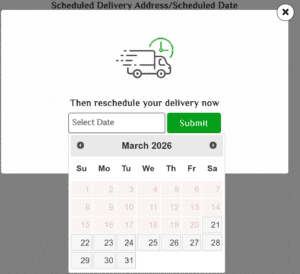
- That delivery date is no longer available
- Customers and dispatchers cannot schedule additional deliveries for that day
This prevents overloaded routes and operational chaos.
5. Allow Customers to Choose Delivery Dates
Once the route configuration is complete, dispatchers can either:
- Schedule deliveries manually

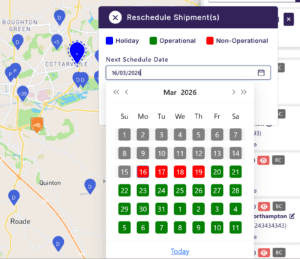
- Or Send email/SMS notifications to recipients allowing them to choose a delivery date.
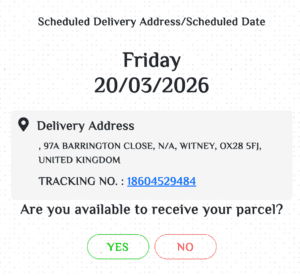
Recipients receive a delivery scheduling link where they can choose from available delivery dates based on the configured route capacity, delivery days, and cutoff rules. , with updates sent via WhatsApp delivery notifications.
Depending on the company’s configuration, the system can handle recipient confirmations in two different ways:
Automatic Update
If enabled, once the recipient confirms their availability through the scheduling link, the selected delivery date is automatically updated in the system and reflected on the dispatcher dashboard.
Manual Confirmation Workflow
Alternatively, the recipient’s selected date can be stored as notes or delivery instructions. The dispatcher can then review the information, confirm the availability with the customer if required, and manually update the delivery schedule in the system.
This flexible configuration allows businesses to choose between fully automated scheduling or a controlled verification process, depending on their operational requirements.
6. Dispatcher Dashboard Visibility
Dispatchers get a clear dashboard showing:
- Jobs scheduled per route
- Daily capacity usage
- Available slots
- Upcoming delivery workloads
This allows teams to plan operations proactively instead of reacting to problems later.

7. Vehicle Volume Capacity Check
In addition to controlling the number of deliveries per route, Capacity Planner also helps ensure that vehicle loading capacity is not exceeded.
The system maintains shipment volume and compares it with the vehicle’s available volume capacity when routes are assigned.
If the combined shipment volume exceeds the vehicle’s capacity, the system automatically provides a warning notification to the dispatcher during route assignment.
This allows dispatchers to:
- Prevent overloading vehicles
- Reassign jobs to another vehicle if required
- Maintain safer and more efficient delivery operations
By automating delivery scheduling, controlling route capacity, and improving planning visibility, businesses can significantly reduce operational inefficiencies. If you’re looking to streamline your delivery operations, you can book a demo to see how Capacity Planner works in real-world scenarios.
How Capacity Planner Helps Different Industries
The Capacity Planner feature is beneficial for any business that manages route-based deliveries or field services.
Here are some industries where it makes a significant impact.
1. Furniture & Large Item Delivery
Examples: Furniture retailers, mattress companies, appliance stores.
How it helps
- Furniture deliveries require route planning and limited daily capacity.
- Capacity Planner allows companies to:
- Assign specific delivery days per postcode/region
- Limit number of deliveries per day
- Let customers choose available delivery dates
- Avoid overloading drivers.
Example
A sofa retailer delivers to Manchester only on Tuesday and Thursday. Customers ordering online will only see those delivery dates.
Benefits
- Prevents vehicle overload
- Reduces failed deliveries
- Improves customer scheduling experience.
2. Appliance & White Goods Delivery
Examples: Washing machines, refrigerators, TVs.
How it helps
- Large appliances require time slots and installation teams.
- Capacity Planner ensures:
- Limited deliveries per route
- Delivery cutoff days.
Example
If the route limit is 20 jobs/day, once reached, jobs cannot be scheduled for that day anymore.
Benefits
- Prevents delivery backlog.
- Control daily installation jobs
- Manage technician workload
- Offer customers realistic delivery dates
3. E-Commerce Last Mile Delivery
Examples: Retail delivery networks, courier companies.
How it helps
- E-commerce companies often struggle with peak order volumes.
- Capacity Planner helps:
- Control daily delivery capacity
- Allow customers to select delivery dates
- Prevent same-day overload.
Example
During Black Friday, the system ensures delivery slots are distributed across days.
Benefits
- Lower operational chaos during peak demand.
- Distribute deliveries across multiple days
- Avoid same-day overload
- Improve route planning
- Maintain service quality during peak demand
4. Grocery & Food Distribution
Examples: Supermarkets, meal kit companies, food wholesalers.
How it helps
- Grocery deliveries are time-sensitive.
- Capacity Planner ensures:
- Per-route limits
- Customer delivery selection
- Cutoff periods before delivery.
Example
If cutoff is 2 days, orders placed Monday will show Thursday onwards delivery slots.
Benefits
- Prevents delivery delays
- Keeps food supply chain efficient.
- Set delivery cutoffs
- Control route capacity
- Offer delivery date options to customers
5. Field Service & Home Services
Examples:
- HVAC repair
- Plumbing services
- Electrical installation
- Home maintenance companies.
How it helps
- Service technicians can only perform limited jobs per day.
- Capacity Planner allows:
- Maximum jobs per technician route
- Customer self-scheduling
- Region-based service days.
Example
A technician route may allow 10 service calls/day.
Benefits
- Prevents technician burnout
- Improves scheduling efficiency.
6. Medical Equipment Delivery
Examples:
- Hospital equipment delivery
- Mobility aids
- Oxygen supply providers.
How it helps
Medical equipment deliveries require careful scheduling and availability confirmation.
Capacity Planner allows:
- Controlled route capacity
- Scheduled delivery confirmations
- Recipient availability confirmation.
Benefits
- Ensures critical deliveries are not delayed
- Improves compliance and reliability.
7. Construction Material & B2B Logistics
Examples:
- Building materials
- Cement suppliers
- Industrial parts delivery.
How it helps
Construction deliveries often require site readiness and truck availability.
Capacity Planner enables:
- Delivery days per region
- Heavy vehicle route planning
- Controlled daily job limits.
Benefits
- Avoids multiple trucks arriving simultaneously
- Reduces site congestion.
- Manage daily truck dispatches
- Avoid multiple deliveries arriving at the same site
- Schedule deliveries by region
8. Pharmacy & Healthcare Distribution
Examples:
- Pharmacy chains
- Healthcare product distributors.
How it helps
Allows:
- Scheduled medicine deliveries
- Delivery cutoffs for order processing
- Balanced distribution workload.
Benefits
- Reliable patient deliveries
- Controlled logistics planning.
9. Laundry & Subscription Services
Examples:
- Laundry pickup and delivery
- Rental equipment services
- Subscription product deliveries.
How it helps
Capacity Planner allows:
- Fixed delivery days per postcode
- Weekly route scheduling
- Automated date allocation.
Benefits
- Predictable operations
- Efficient route utilization.
Why Capacity Planning Matters for Delivery Operations
Without proper planning, delivery companies face problems like:
- Overbooked routes
- Delayed deliveries
- Driver fatigue
- Failed delivery attempts
- Poor customer experience
- Vehicles exceeding safe loading capacity
Capacity Planner solves these challenges by ensuring every delivery is scheduled based on actual operational capacity.
The result?
- Better route optimization
- Improved delivery success rates
- Higher customer satisfaction
- More predictable operations
- Better vehicle load management
Common Capacity Planning Mistakes in Delivery Operations
Many delivery businesses struggle with operational inefficiencies not because of a lack of orders, but because of poor capacity planning. Without proper systems in place, dispatchers often rely on manual assumptions that lead to operational bottlenecks.
Here are some of the most common mistakes delivery companies make when planning their delivery capacity.
1. Overbooking Delivery Routes
One of the most frequent issues is assigning too many deliveries to a single route in a day. While it may seem efficient initially, overloaded routes often lead to delays, driver fatigue, and missed delivery windows.
By setting daily job limits per route, companies can ensure drivers are assigned manageable workloads and deliveries are completed on time.
2. Ignoring Vehicle Load Capacity
Another common mistake is focusing only on the number of deliveries, while ignoring the actual volume of shipments.
A route may have only a few deliveries, but if the shipments are large, the vehicle may exceed its cubic meter (CBM) capacity.
With volume monitoring, dispatchers can receive warnings when a route exceeds vehicle capacity, helping them redistribute deliveries or assign a larger vehicle.
3. Allowing Customers to Select Unrealistic Delivery Dates
When customers are allowed to choose delivery dates without considering operational constraints, businesses often face overbooked delivery days.
Capacity Planner solves this by showing customers only the delivery dates that are actually available, based on route schedules, job limits, and cutoff rules.
4. Lack of Delivery Cutoff Rules
Without scheduling cutoffs, customers may select delivery dates that are too soon for operations teams to prepare shipments.
Cutoff rules ensure that businesses have enough time to process orders, prepare shipments, and plan routes efficiently.
5. Poor Visibility of Delivery Capacity
When dispatchers lack visibility into how many deliveries are scheduled for each route and day, planning becomes reactive rather than proactive.
A centralized dashboard showing route capacity, scheduled jobs, and available delivery slots allows dispatch teams to plan their operations with greater clarity.
Final Thoughts
As delivery networks grow and customer expectations increase, businesses need smarter tools to manage their logistics.
The Capacity Planner in InstaDispatch empowers dispatchers to control workloads, optimize routes, and offer customers convenient delivery scheduling — all while ensuring operations run smoothly.
Whether you’re managing furniture deliveries, e-commerce logistics, field services, or grocery distribution, capacity planning is the key to running efficient and scalable delivery operations.
With InstaDispatch, planning deliveries becomes simpler, smarter, and far more efficient.
