
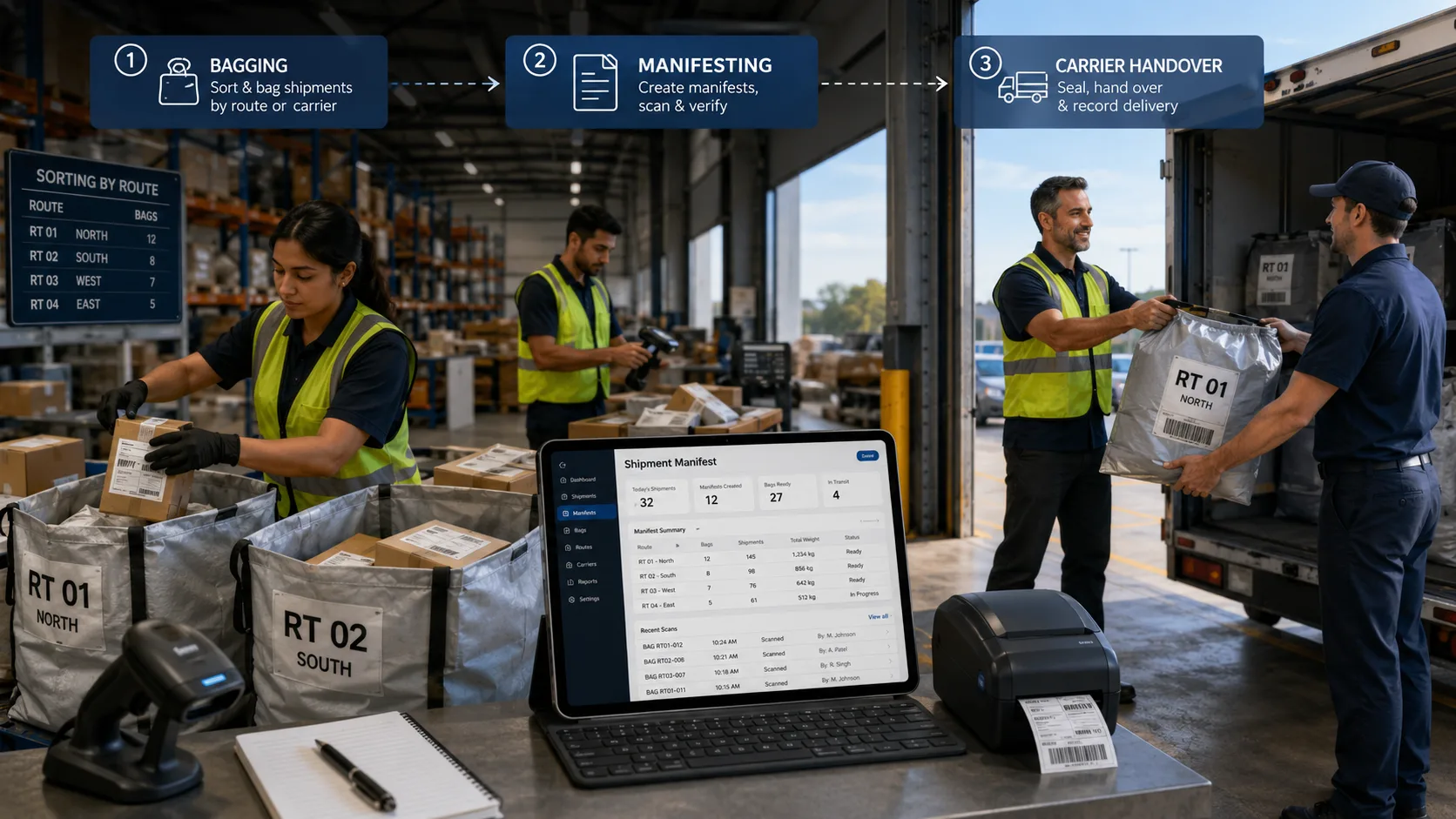

Freight consolidation is an important process for courier companies, freight forwarders, cross-border delivery businesses, and logistics providers that handle multiple parcels moving through depots, hubs, carriers, and delivery networks.
Instead of processing every parcel separately at every stage, freight consolidation allows businesses to group multiple parcels together into bags or cartons. These grouped shipments can then be moved more efficiently through origin depots, destination depots, carrier networks, and final-mile delivery operations.
However, consolidation only works properly when every parcel remains traceable. Once parcels are grouped together, businesses need clear answers to important operational questions.
- Which parcels are inside this bag?
- Has each parcel been scanned and validated?
- Which destination depot is this bag moving to?
- Which carrier is handling the next stage?
- Has the manifest been generated?
- Has the bag reached the destination depot?
- Were all parcels found during breakdown scanning?
- Has the final delivery been completed with proof of delivery?
This is where freight consolidation software becomes useful. It helps delivery businesses manage the complete movement of parcels from booking to scanning, bagging, manifesting, carrier handover, depot receiving, breakdown scanning, final delivery, and proof of delivery.
In this blog, we will explain how freight consolidation software works, what bagging and manifesting mean, how carrier handover is managed, and why this process is valuable for delivery and freight forwarding businesses.
What Is Freight Consolidation Software?
Freight consolidation software is a system that helps logistics teams group multiple parcels into a single transport unit, such as a bag or carton, and manage the full movement of those parcels through different delivery stages.
In a typical courier or freight forwarding operation, shipments may be collected from customers, stores, warehouses, suppliers, or local branches. These shipments may not all move individually to the final destination. Instead, they are sorted by destination, service type, route, carrier, depot, hub, or country.
For example, a freight forwarding company may collect parcels from different customers in the UK. Some parcels may be going to Dubai, some to Colombo, some to New York, and others to different destinations. Rather than handling each parcel separately during the next transport stage, the business can group the relevant parcels into destination-based bags or cartons.
Each bag or carton then becomes easier to scan, manifest, hand over, track, and verify.
A freight consolidation system can also work as part of a connected freight forwarding system, helping businesses create this structure digitally. It connects each parcel with the correct bag, carton, manifest, carrier, destination depot, tracking record, and final delivery status. This reduces manual confusion and gives operations teams better control over every shipment movement.
Why Freight Consolidation Matters for Delivery Businesses
Freight consolidation is not just about putting parcels together. It directly affects operational accuracy, delivery visibility, cost control, customer communication, and handover management.
Without a proper system, consolidation can quickly become difficult to manage. Teams may depend on paper lists, spreadsheets, WhatsApp messages, manual carrier portals, or disconnected tracking records. This creates a higher risk of parcels being added to the wrong bag, missed during handover, delayed at the destination depot, or difficult to trace after carrier forwarding.
For delivery businesses, these issues can lead to:
- Delayed shipments
- Incorrect carrier handovers
- Missing parcel claims
- Manual checking at depots
- Customer service pressure
- Poor shipment visibility
- More time spent checking carrier portals
- Difficulty proving what was sent and received
Freight consolidation software helps reduce these problems by creating a clear digital record at every stage. Each scan, bag, carton, manifest, carrier handover, tracking update, and POD can be connected to the original shipment record.
This is especially useful for freight forwarders, courier networks, international delivery businesses, e-commerce logistics providers, and companies that use a mix of internal fleet and external carriers.
The Freight Consolidation Workflow
A freight consolidation workflow usually includes the following stages:
- Booking the shipment
- Scanning and validating parcels
- Creating bags or cartons
- Generating a digital manifest
- Printing external carrier labels if required
- Handing over to an internal or external carrier
- Tracking shipment movement
- Receiving at the destination depot
- Breaking down the bag or carton
- Scanning parcels for final delivery
- Capturing proof of delivery
Each stage must be controlled carefully. If one step is missed, the business may lose visibility over the parcel movement.
Freight consolidation software brings these stages into one connected workflow.
Step 1: Shipment Booking
The process starts when a shipment is booked in the system. The booking may be created by the admin team, operations team, customer portal, API, e-commerce integration, or another connected platform.
At the booking stage, the system captures important shipment details such as sender information, receiver information, parcel details, service type, destination, weight, dimensions, and carrier preference.
For some businesses, the shipment may first be handled by their own internal fleet through a freight forwarding system. For others, it may be booked directly with an external carrier. A flexible freight consolidation system should support both scenarios.
This is important because freight forwarding operations often involve multiple movement stages. A parcel may be collected locally by the company’s own driver, processed at the origin depot, consolidated into a bag or carton, and then handed over to an external carrier for the next stage.
By keeping the booking inside one freight management software platform, the business avoids duplicate data entry and keeps the shipment record connected from the beginning.
Step 2: Parcel Scanning and Validation
Before parcels are added to a bag or carton, they should be scanned and validated.
This is one of the most important steps in the freight consolidation process. Scanning confirms that the parcel exists in the system and is eligible to move into the next stage.
Without scan validation, teams may accidentally add the wrong parcel to a bag, include a parcel that has not been properly booked, or miss a parcel that should have been consolidated. This can create problems during manifesting, customs checks, carrier handover, destination depot receiving, or final delivery.
A good freight consolidation system should validate the parcel before allowing it to be grouped. This means the system checks whether the parcel ID, barcode, or shipment reference exists in the platform.
If the parcel is valid, the team can continue. If the parcel is not found, the system can stop the process and alert the user.
This improves operational accuracy and helps prevent unknown, duplicate, or incorrect parcels from entering the consolidation flow.
Step 3: Bagging and Carton Creation
Once parcels are scanned and validated, they can be grouped into a consolidated unit.
This unit may be a bag, carton, sack, cage, or another parcel container depending on the business operation. In many freight forwarding and courier operations, bagging is commonly used when multiple small parcels are grouped together for movement to the same destination, depot, hub, or country.
For example, a team may create a bag for parcels moving from London to Colombo. Every parcel scanned into that bag is digitally linked to the bag ID. The bag may also include details such as destination hub, origin depot, total parcel count, total weight, seal number, carrier, and status.
This creates a clear digital record of what is inside the bag.
Bagging is useful because it allows operations teams to move many parcels as one controlled unit during depot transfer or carrier handover. Instead of checking every parcel manually at every movement point, teams can scan the bag, view its contents, and verify the associated manifest.
However, individual parcel traceability should never be lost. The system should still allow teams to see every parcel inside the bag or carton and track each parcel through to final delivery.
Step 4: Seal and Destination Control
In many freight operations, bags or cartons are sealed before dispatch. The seal helps confirm that the bag or carton has not been opened or changed after it was prepared.
Freight consolidation software can store the seal number against the bag or carton record. This gives depot teams and handover teams a way to verify that the unit being received is the same unit that was dispatched.
Destination control is also important. Each bag or carton should be linked to the correct destination hub, branch, country, or carrier route. This prevents operational confusion and helps teams sort consolidated shipments correctly.
For example, if a bag is created for a specific destination depot, the system should clearly show that destination during scanning, manifesting, and handover.
Also Read: What Is Freight Consolidation and How Does It Reduce Shipping Costs?
Step 5: Digital Manifest Generation
After the bag or carton is created, the next step is manifesting.
A manifest is a digital document or record that lists the parcels included in a consolidated shipment unit. It acts as proof of what is being dispatched, handed over, or received.
A freight manifest may include:
- Bag ID or carton ID
- Manifest number
- Origin depot
- Destination depot
- Carrier name
- Parcel references
- Sender and receiver details
- Parcel count
- Weight details
- Service type
- Dispatch date and time
- Seal number
- Status updates
Digital manifesting is much more reliable than manual paperwork because it is generated from scanned parcel data. This reduces the chance of missing parcels, incorrect references, or mismatched shipment counts.
Manifesting is useful for internal depot handover, external carrier handover, customs documentation, operational verification, and customer service support.
For delivery businesses, the manifest becomes an important control document. If a dispute happens later, the team can check what was included in the bag, when it was manifested, who handled it, and where it moved next.
Step 6: Carrier Handover
Carrier handover is the point where the shipment is passed to another party for the next stage of movement.
This may be an external carrier, airline partner, freight partner, destination hub, another branch, or another internal carrier within the same business network.
For example, a parcel may be collected by an internal driver in Manchester, processed at the origin depot, consolidated into a bag, and then handed over to an external carrier for international movement.
A major challenge in carrier handover is maintaining visibility. Many businesses lose control once the shipment leaves their own depot. Teams may then need to log into multiple carrier portals to check tracking updates, print labels, or confirm shipment status.
Freight consolidation software helps by keeping the handover connected to the original shipment record. When the shipment is forwarded to an external carrier, the system should store the carrier details, tracking number, label, handover time, manifest, and status updates.
This gives internal teams and customers a more consistent tracking experience.
Step 7: External Carrier Label Printing
When a shipment is booked with or forwarded to an external carrier, a carrier label may need to be generated and printed.
If this is handled outside the freight consolidation system, teams may need to log into a separate carrier portal, re-enter shipment details, print the label, and then manually update the original system.
This creates extra work and increases the risk of data mismatch.
A connected freight consolidation platform can allow external carrier labels to be printed directly from the system. This keeps the shipment, label, carrier, and tracking record connected in one place.
For warehouse and depot teams, this makes preparation faster. Parcels can be scanned, validated, bagged, manifested, labelled, and prepared for handover without unnecessary platform switching.
Step 8: Shipment Tracking After Handover
After carrier handover, tracking becomes critical.
Customers and operations teams want to know where the shipment is, whether it has departed, whether it has reached the destination depot, and whether it has been delivered.
If tracking is disconnected, customer service teams may spend time checking multiple systems or contacting carriers manually. This slows down response times and creates frustration for customers.
Freight consolidation software can help centralise tracking updates. Even after a shipment is forwarded to an external carrier, the tracking status can remain visible inside the main platform.
A connected freight forwarding system gives teams one place to monitor shipment progress and reduces the need for manual carrier portal checks.
For freight forwarders and courier businesses, this improves visibility across internal and third-party movement.
Step 9: Destination Depot Receiving
When a consolidated bag or carton reaches the destination depot, it should be scanned on arrival.
This confirms that the consolidated unit has reached the correct location. The scan also updates the shipment record, giving the origin team and customer service team visibility over the movement.
Destination depot receiving is especially important in hub-based and international operations. Bags or cartons may move through multiple locations before reaching the final delivery stage. Each scan creates a traceable event in the shipment journey.
If a bag is expected but not received, the system can help identify where the last scan took place. If a bag is received at the wrong destination, the issue can be detected earlier.
Step 10: Breakdown Scan and Parcel Verification
After the consolidated unit reaches the destination depot, the bag or carton is opened and broken down.
At this stage, individual parcels are scanned again and checked against the manifest. This confirms whether the actual parcel contents match the digital record.
Breakdown scanning helps identify:
- Missing parcels
- Extra parcels
- Incorrect parcels
- Damaged parcels
- Misrouted parcels
- Manifest mismatches
This is a key control point in freight consolidation. It ensures that the parcels prepared at origin are the same parcels received at destination.
Without breakdown scanning, errors may only be discovered at the final delivery stage, when it is much harder to investigate.
Step 11: Final Mile Delivery and POD
Once parcels are verified at the destination depot, they can be prepared for final delivery.
The final mile may be handled by the company’s own drivers, another internal branch, or an external delivery partner. Regardless of who completes the final delivery, the shipment record should remain connected.
Proof of delivery is the final confirmation that the parcel has been delivered successfully. Depending on the operation, POD may include a signature, photo, timestamp, receiver name, GPS location, or delivery notes.
When POD is stored against the original shipment record, the business has complete visibility from booking to final delivery.
This is valuable for customer support, dispute handling, delivery verification, and performance reporting.
Benefits of Freight Consolidation Software
Freight consolidation software can bring several operational benefits to delivery businesses.
First, it improves parcel traceability. Every parcel is connected to a bag or carton, manifest, carrier, depot scan, tracking update, and final delivery record.
Second, it reduces manual work. Teams do not need to depend only on spreadsheets, paper manifests, or separate carrier portals.
Third, it improves handover accuracy. Digital manifests and scan validation reduce the chance of incorrect parcels being handed over.
Fourth, it gives better visibility after carrier handover. Internal teams can continue monitoring shipments even when external carriers are involved.
Fifth, it supports faster depot operations. Bag scanning, breakdown scanning, and manifest verification help teams process consolidated shipments more efficiently.
Finally, it improves customer communication. When tracking and POD are available in one system, teams can answer customer questions faster and with more confidence.
Who Needs Freight Consolidation Software?
Freight consolidation software is useful for businesses that move parcels through multiple operational stages.
This includes:
- Freight forwarders
- Courier companies
- International parcel delivery businesses
- Cross-border logistics providers
- E-commerce fulfilment and delivery companies
- Hub-and-spoke delivery networks
- Businesses using both internal fleet and external carriers
- Companies that group parcels by destination, depot, route, or country
If a business regularly scans, groups, forwards, manifests, hands over, tracks, and verifies parcels, then a freight consolidation system can help bring more control to the process.
How Freight Consolidation Software Helps Reduce Operational Errors
Operational errors often happen when teams rely on manual checking, handwritten records, paper manifests, or separate carrier systems. A parcel may be scanned at collection but not linked properly to a bag. A bag may be handed over without a clear manifest. A carrier label may be printed separately and not updated in the main shipment record.
These small gaps can create bigger problems later.
Freight consolidation software reduces these risks by creating a connected chain of events. Every action is recorded against the shipment. Teams can see when the parcel was booked, when it was scanned, which bag or carton it was added to, which manifest it was included in, when it was handed over, and when it reached the destination depot.
This creates better accountability across the operation.
For example, if a customer asks where their parcel is, the team does not need to search through multiple spreadsheets or carrier portals. They can check the shipment record and see the latest available status.
If a depot reports that a parcel is missing, the team can review the bag contents, manifest record, origin scan, handover scan, and destination breakdown scan. This makes investigation easier and faster.
Why Digital Control Is Important for Freight Forwarders
Freight forwarders often work with multiple parties. A single shipment may involve the customer, origin depot, internal driver, destination depot, external carrier, airline partner, customs process, and final delivery partner.
Because so many parties are involved, visibility can easily become fragmented.
Digital freight consolidation software helps freight forwarders keep the shipment journey connected. Even when the parcel moves from an internal operation to an external carrier, the forwarding record remains inside the system.
This helps freight forwarders manage customer expectations, track handovers, monitor destination receiving, and confirm final delivery.
For businesses handling international or multi-carrier parcel movement, this digital control is especially important. It helps reduce dependency on manual updates and gives the operations team a clearer view of what is happening across the network.
Final Thoughts
Freight consolidation is a practical way for delivery businesses to manage parcel movement more efficiently. But consolidation only works when the business has full visibility over every parcel inside every bag or carton.
Bagging helps group parcels for easier movement. Manifesting creates a clear digital record of what is being dispatched. Carrier handover connects the shipment to the next movement stage. Depot scanning confirms arrival and contents. Tracking and POD complete the shipment journey.
Freight consolidation software brings all these steps together into one connected workflow. It helps delivery businesses reduce manual work, improve parcel accuracy, manage internal and external carrier movement, and maintain traceability from booking to final delivery.
For freight forwarders and courier businesses handling growing parcel volumes, this level of control is no longer just useful. It is becoming essential for reliable, scalable, and transparent delivery operations.
