
How to Make a Shipment Eligible for Invoicing
Invoice Generation Rules allow you to define which shipment statuses are eligible for invoicing.
Only shipments matching these selected statuses will be included during invoice generation.
1. How to Access
➡️ Navigate through the system:
- Go to Customers
- Click Customer Invoice
- Select Invoice Generation Rules
2. Open Invoice Generation Rules
- Click on Invoice Generation Rules
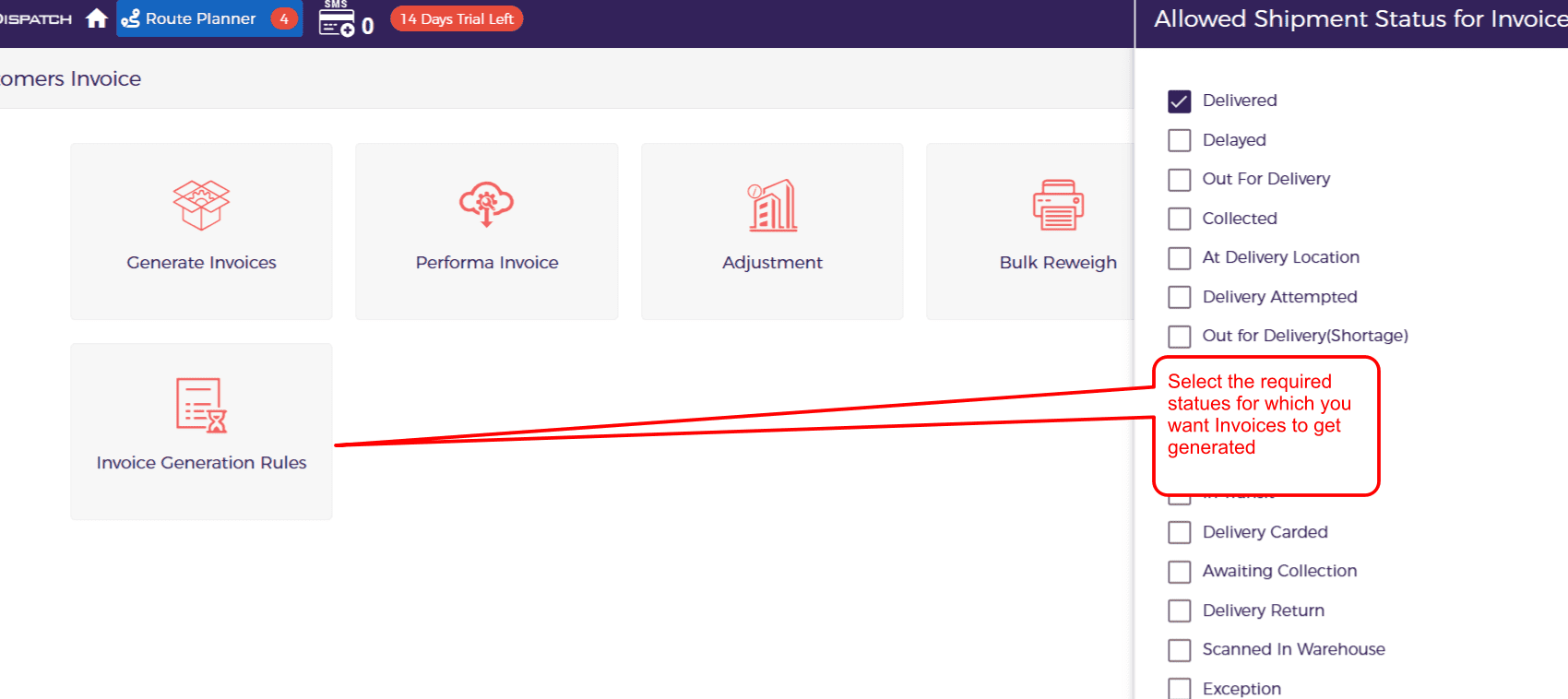
3. Select Eligible Shipment Status
You will see a list of shipment statuses such as:
- Delivered ✅ (default selected)
- Delayed
- Out for Delivery
- Collected
- At Delivery Location
- Delivery Attempted
- Exception
- Awaiting Collection
- Delivery Return
- Scanned in Warehouse
- etc.
👉 Select the statuses for which you want invoices to be generated
4. How It Works
Only shipments with selected statuses will:
- Be picked during invoice generation
- Be included in invoices
Example:
- If only Delivered is selected → only delivered shipments will be invoiced
- If multiple statuses are selected → all those shipments will be included
Output
- Invoice generation will include only eligible shipments
- Ensures accurate billing based on shipment status
Important Notes
- Default status is usually Delivered
- Incorrect selection may:
- Exclude valid shipments
- Include incomplete shipments
Best Practices
- Use Delivered for standard billing
- Add other statuses only if required by business process
