

Many logistics teams still manage deliveries using spreadsheets, phone calls, WhatsApp messages, paper notes, manual route planning, and disconnected systems.
At a low delivery volume, this may feel manageable. A dispatcher can call a driver, update a spreadsheet, message the customer, and manually confirm delivery status. But as delivery volume grows, the same process becomes harder to control.
Dispatchers spend too much time assigning jobs manually. Drivers may not receive complete job details. Customers keep asking for delivery updates. Failed delivery attempts are not always recorded properly. Proof of delivery may arrive late or go missing. ETA accuracy becomes unreliable. Invoicing and reporting become difficult because delivery data is scattered across different places.
The issue is not only speed. The bigger problem is visibility, control, and consistency across the full delivery operation.
That is why delivery companies do not just need “software.” They need the right set of delivery management software tools that support the complete delivery workflow from booking to dispatch, route planning, driver updates, delivery tracking, proof of delivery, customer communication, and invoicing.
What are delivery management software tools?
Delivery management software tools are digital systems that help logistics teams manage delivery bookings, dispatch jobs, optimize routes, track drivers, update customers, collect proof of delivery, record failed attempts, and manage delivery reporting or invoicing from one platform.
For courier companies, same-day delivery operators, freight forwarding teams, last-mile delivery businesses, and eCommerce delivery teams, these tools help replace manual coordination with a more controlled delivery process.
Why Manual Delivery Management Becomes Hard to Control
Manual delivery management often looks simple from the outside. A booking comes in, a dispatcher assigns the job, the driver completes the delivery, and the customer receives the parcel.
In real delivery operations, there are many moving parts between those steps.
- A dispatcher may need to manage multiple pickups, delivery addresses, time windows, driver availability, customer instructions, failed attempts, urgent changes, and proof of delivery records. When this information is spread across spreadsheets, calls, paper notes, emails, and messaging apps, it becomes difficult to know what is happening in real time.
- Spreadsheets can store delivery information, but they do not show live delivery progress. Phone calls can help solve urgent issues, but they slow down dispatchers and drivers when used for every update. Manual route planning can work for a few stops, but it becomes unreliable when there are multiple drivers, locations, time windows, and route changes.
- Customer service teams also struggle when they do not have live delivery information. When customers ask, “Where is my delivery?” the team may need to call the dispatcher, who then calls the driver, who may already be on another job. This creates delay, pressure, and inconsistent communication.
- Paper proof of delivery creates another problem. If signed delivery notes are delayed, lost, or stored separately, the business may struggle to confirm completed deliveries. Failed delivery attempts can also create disputes if the reason, time, location, or photo evidence is not recorded properly.
- Billing becomes more difficult too. When delivery data, pricing, surcharges, zones, mileage, and job completion records are stored in different places, finance teams need to check details manually before creating invoices. This increases the risk of billing errors and slows down the invoicing process.
- Manual systems also make delivery operations dependent on individual staff members. If only one dispatcher understands the spreadsheet, the process becomes fragile. A delivery business needs a repeatable system, not a workflow that depends on memory, calls, and scattered notes.
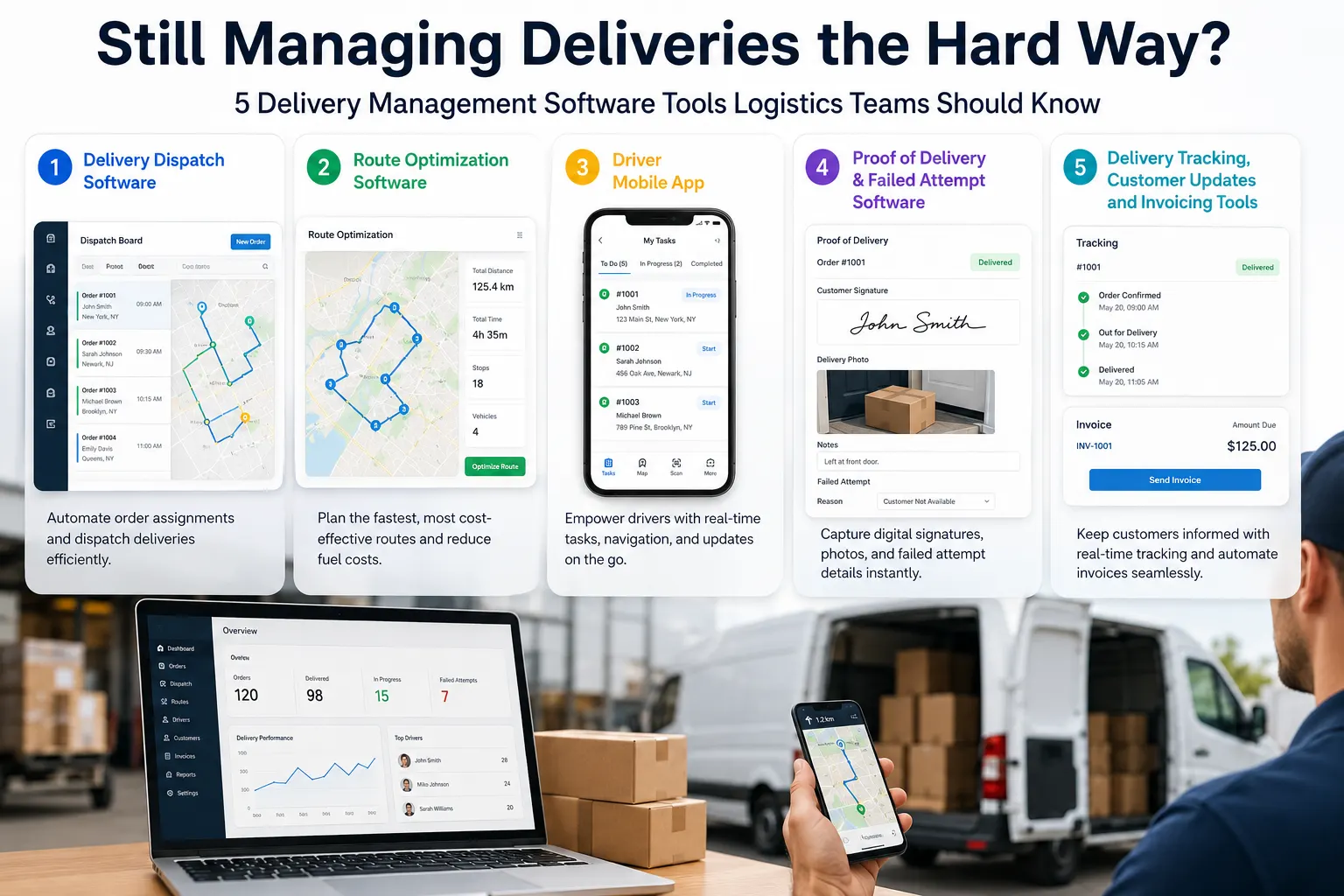
5 Delivery Management Software Tools Logistics Teams Should Know
Modern delivery companies need connected tools that help manage the full delivery lifecycle. Below are five important delivery management software tools logistics teams should understand before choosing a system.
1. Delivery Dispatch Software
Delivery dispatch software helps logistics teams create, assign, manage, and monitor delivery jobs from one system.
Instead of managing jobs through spreadsheets, calls, and messages, dispatchers can use delivery management software to view bookings, assign drivers, update job statuses, and monitor delivery progress from a central dashboard.
A delivery dispatch software tool typically supports:
- Job creation and booking management
- Pickup and delivery job assignment
- Driver allocation
- Delivery status updates
- Dispatcher visibility across active jobs
- Centralized delivery records
- Faster operational decisions
This matters because dispatch is the control point of delivery operations. If dispatchers do not have a clear view of bookings, drivers, routes, and job statuses, confusion increases as delivery volume grows.
For example, a courier company may receive same-day delivery requests from multiple customers and need courier dispatch software to assign jobs quickly and keep delivery updates visible. If these jobs are entered manually into a spreadsheet, the dispatcher must check driver availability, call drivers, share addresses, confirm updates, and manually update job status. This process becomes slow and error-prone when the number of jobs increases.
With delivery dispatch software, the dispatcher can manage the workflow in one place. Jobs can be created, assigned, tracked, and updated more consistently.
InstaDispatch helps delivery teams manage bookings, dispatch jobs, assign drivers, and track delivery progress through a cloud-based delivery management system. It is designed for delivery companies that want to move away from manual dispatching and manage operations with better visibility.
2. Route Optimization Software
Route optimization software helps delivery companies plan better routes based on delivery locations, start points, end points, timing, driver workload, and delivery requirements.
For logistics teams managing multiple stops, route planning is one of the most important parts of delivery operations. Poor route planning can lead to late deliveries, wasted driver hours, higher fuel usage, missed delivery windows, and customer complaints.
Route optimization software can help teams plan routes more accurately by considering:
- Multi-stop delivery locations
- Route start point and end point
- Delivery sequence
- ETA calculation
- Route start time and route end time
- Total distance
- Estimated travel time
- Driver workload
- Delivery timing requirements
Why do logistics teams need route optimization software?
Logistics teams need route optimization software because manual route planning becomes unreliable when there are multiple drivers, delivery locations, time windows, and changing delivery priorities. Route optimization helps teams plan routes more accurately and improve ETA visibility.
For example, if a dispatcher has 40 drops across different areas, manually deciding the best sequence can take time and still produce inefficient routes. A route may look correct on a spreadsheet but cause unnecessary backtracking, late arrivals, or unrealistic ETAs.
Route optimization software helps dispatchers make better planning decisions. It can calculate estimated distance and time, show route start and end visibility, and support better delivery sequencing.
InstaDispatch includes route optimization features that help delivery companies plan routes, calculate ETAs, estimate distance and time, and give dispatchers better control over route planning. This is useful for courier businesses, last-mile delivery operators, same-day delivery companies, and logistics teams handling multi-drop deliveries.
3. Driver Mobile App
A driver mobile app connects drivers with the dispatch team and gives them access to job details, route information, status updates, delivery instructions, and proof of delivery tasks.
Drivers are the people completing deliveries in the field. If they do not receive accurate information or cannot update the system easily, dispatchers lose visibility. A driver mobile app helps reduce dependency on phone calls, manual messages, and paper-based updates.
A delivery driver app should support:
- Assigned job lists
- Pickup and delivery details
- Customer instructions
- Route or navigation guidance
- Delivery status updates
- Failed attempt updates
- Proof of delivery capture
- Driver-to-dispatch communication
- Delivery history updates
What should a delivery driver app include?
A delivery driver app should include assigned jobs, route details, pickup and drop-off information, customer instructions, delivery status updates, failed attempt options, and electronic proof of delivery capture.
This is important because delivery accuracy depends on the information drivers receive and the updates they can send back.
For example, if a driver reaches a delivery location and the customer is unavailable, the driver should be able to record the failed attempt immediately. The app should allow the driver to update the job status, add notes, capture photo evidence if required, and send the update back to the system.
Without a driver mobile app, the driver may call the dispatcher, send a WhatsApp message, or write notes manually. These updates can be missed, delayed, or difficult to connect with the correct delivery record.
InstaDispatch provides a driver mobile app that helps drivers receive job details, update delivery progress, and capture delivery information from the field. This helps dispatchers maintain better visibility over live delivery operations.
4. Proof of Delivery and Failed Attempt Software
Proof of delivery software helps delivery businesses confirm that a job was completed and record delivery evidence digitally.
A delivery is not truly complete until it is recorded correctly. If proof of delivery is missing, delayed, or unclear, the business may face customer disputes, payment delays, internal confusion, or repeated follow-ups.
Electronic proof of delivery can include:
- Digital signature proof
- Photo proof
- Delivery notes
- Time-stamped updates
- Delivery status confirmation
- Failed pickup records
- Failed delivery attempt records
- Delivery history
- Customer and internal records
Why is electronic proof of delivery important?
Electronic proof of delivery is important because it gives delivery companies a digital record that a delivery was completed, including details such as time, status, signature, photo proof, or delivery notes. It helps reduce disputes and improves delivery accountability.
Failed attempt recording is just as important as completed delivery confirmation. When a pickup or delivery fails, the business needs to know why. Was the customer unavailable? Was the address incorrect? Was access restricted? Was the parcel refused?
If these details are not recorded properly, the dispatcher may not know what action to take next. Customer service may not have a clear answer. Billing may also become complicated if failed attempt charges or redelivery fees apply.
Proof of delivery software helps create a reliable delivery record. It gives operations teams, customers, and finance teams better visibility into what happened during the delivery process.
InstaDispatch supports delivery teams with proof of delivery and failed attempt recording so that dispatchers, customers, and operations teams can see what happened during each job.
5. Delivery Tracking, Customer Updates and Invoicing Tools
Delivery tracking and customer update tools help businesses keep customers informed, while invoicing tools help convert completed delivery data into billing records.
Delivery operations do not end when a driver completes a drop. Customers need updates, internal teams need delivery history, and finance teams need accurate information for billing.
Delivery tracking software and customer update tools can help with:
- Live delivery tracking
- Customer delivery updates
- ETA updates
- Delivery status visibility
- Reduced “where is my delivery?” calls
- Delivery history
- Internal delivery records
- Customer communication
When customers receive clear updates, they are less likely to contact the business repeatedly for delivery status. This reduces pressure on customer service teams and improves the overall delivery experience.
Invoicing is another important part of delivery operations. Delivery invoicing software helps teams use delivery data for pricing, surcharges, zones, completed jobs, and billing records.
For courier companies and logistics teams, manual invoicing can become difficult when delivery information is spread across multiple tools. If completed deliveries, failed attempts, customer rates, distance, zones, or surcharges are not stored clearly, invoices need manual checking.
This increases the chance of errors and slows down payment cycles.
Delivery companies may also need delivery software integrations that connect with eCommerce, courier, carrier, or accounting systems. Depending on the operation, integrations with platforms such as Shopify, WooCommerce, QuickBooks, UPS, FedEx, DHL, or other operational systems can help reduce duplicate data entry and improve workflow continuity.
For businesses handling local courier work, last-mile delivery, eCommerce deliveries, or same-day services, connected tracking, customer communication, and invoicing tools help make delivery operations more consistent.
How These Tools Work Together in a Real Delivery Workflow
The real value of delivery management software tools is not only in each individual feature. The value comes when dispatch, routing, driver communication, tracking, proof of delivery, and invoicing work together.
A typical delivery workflow may look like this:
- A booking or delivery order is created.
- The dispatcher reviews the job details.
- The job is assigned to the right driver.
- Route optimization helps plan the delivery route.
- The driver receives job and route details in the mobile app.
- The customer receives delivery updates.
- The driver updates job statuses during the route.
- Proof of delivery or failed attempt details are captured.
- The operations team reviews delivery history.
- Delivery data supports reporting and invoicing.
If each step is managed in a different system, gaps can still appear. The dispatcher may use one tool, the driver may use another, customer updates may be sent manually, and invoices may be created from a separate spreadsheet.
A connected delivery management platform reduces these gaps. It helps logistics teams manage delivery operations from one place instead of moving between disconnected tools.
This is especially important for businesses using courier management software, same-day delivery software, last mile delivery software, or courier delivery software to manage growing delivery volume.
Signs Your Delivery Business Has Outgrown Manual Tools
Your delivery business may have outgrown spreadsheets, calls, and disconnected systems if:
- Dispatchers spend too much time calling drivers.
- Customers frequently ask for delivery updates.
- Drivers receive incomplete job details.
- Routes are planned manually every day.
- ETAs are often wrong.
- Failed deliveries are not recorded clearly.
- PODs are delayed, missing, or stored separately.
- Delivery reports take too long to prepare.
- Invoices need manual checking.
- Managers cannot see live delivery progress.
- Customer service teams do not have real-time answers.
- Delivery updates are stored in WhatsApp chats or emails.
- Operations depend too heavily on one dispatcher’s knowledge.
These signs usually appear when delivery volume, customer expectations, or operational complexity increases.
At this stage, the business does not only need a faster process. It needs better delivery visibility, cleaner records, driver coordination, delivery automation, and repeatable workflows.
What to Look for in Delivery Management Software
Choosing best delivery management software should not be based only on the number of features. Delivery companies should look for tools that match their real operational workflow.
Important capabilities include:
- Cloud-based access
- Easy dispatch management
- Route optimization
- Driver mobile app
- Live delivery tracking
- Customer notifications
- ETA accuracy
- ePOD and failed attempt recording
- Reporting
- Invoicing support
- Delivery software integrations
- Scalability for growing delivery operations
- Usability for dispatchers and drivers
Cloud-based delivery management software is useful because teams can access delivery information from different locations. Dispatchers, managers, drivers, and operations teams can work from updated information instead of relying on locally stored files or manual records.
Usability is also important. If dispatchers find the software difficult to use, they may continue relying on manual workarounds. If drivers cannot update jobs quickly from the field, delivery visibility will still be incomplete.
The right logistics software should make day-to-day delivery operations easier to manage, not more complicated.
Where InstaDispatch Fits
InstaDispatch is a cloud-based delivery management software designed for courier, logistics, freight forwarding, eCommerce delivery, same-day delivery, and last-mile delivery operations.
It helps delivery teams manage key parts of the delivery workflow, including:
- Delivery booking and dispatch management
- Courier management software workflows
- Route optimization
- Driver mobile app updates
- ETA visibility
- Customer delivery updates
- Proof of delivery
- Failed attempt recording
- Delivery tracking
- Invoicing and reporting
- Integrations with delivery, eCommerce, carrier, and accounting systems
InstaDispatch is not positioned as the only solution for every delivery business. It is a practical platform for teams that want to replace manual delivery management with a connected system that supports dispatching, routing, driver updates, customer communication, POD, tracking, and invoicing.
For delivery companies still managing jobs through spreadsheets, calls, and disconnected tools, InstaDispatch helps bring the delivery operation into one cloud-based platform.
Conclusion
Logistics teams do not need to keep managing deliveries the hard way.
As delivery volume increases, spreadsheets, calls, manual route planning, paper notes, and disconnected tools create delays, errors, poor visibility, and customer service pressure. What once worked for a smaller operation can become difficult to control as routes, drivers, customers, and delivery expectations grow.
The right delivery management software tools help delivery companies manage dispatching, routing, driver updates, customer communication, proof of delivery, tracking, and invoicing in a more structured way.
For courier businesses, freight forwarding teams, eCommerce delivery teams, same-day delivery operators, and last-mile delivery companies, connected delivery management software can help improve visibility across the full delivery workflow.
If your delivery team is still relying on spreadsheets, calls, and disconnected tools, InstaDispatch can help you manage delivery operations from booking to proof of delivery in one cloud-based platform.
Book a demo with InstaDispatch to see how delivery management software can simplify your delivery operations.
